Pixelist Photography Powerpoint: Clean, Modern Slides for Creatives
A Template Built for Visual Storytelling
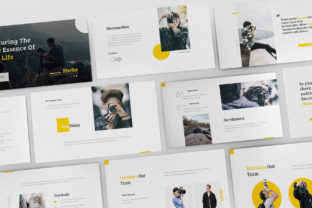
When presenting a photography portfolio or a creative service, the medium is part of the message. A cluttered, generic slide deck can undermine the professionalism of your work before you even speak. The Pixelist - Photography Powerpoint template is designed to solve that specific problem. It’s a presentation tool built with a flat design philosophy, emphasizing clean, minimalist layouts that let your images do the talking. The overall appeal is one of modern sophistication—think of it as a digital gallery space where your photos are the featured exhibition. Its personality is confident and uncluttered, creating a sense of professionality that aligns with high-end creative services. The template uses a thoughtful combination of serif font (Bree Serif) for headings and a sans serif font (Raleway) for body text, a classic font pairing that ensures readability while adding a touch of editorial elegance.
Where This Template Shines: Real-World Applications
The strength of the Pixelist - Photography Powerpoint lies in its versatility across different projects. For a freelance photographer, it’s the perfect tool for client pitches, allowing you to showcase your portfolio in a professional and modern light. The overlay picture effect and object placeholders mean you can insert your images with a single click, making the setup process genuinely pain-free. This isn't just about photography presentations; it’s a robust design asset for anyone in a visual field. A graphic designer can use it to present brand identity concepts, a marketer can outline a social media campaign, and a blogger can create a media kit. The 35+ unique creative slides provide enough structure for a comprehensive proposal without feeling repetitive. Because it includes print-ready files and retina and Full HD resolution, your work will look sharp whether projected on a screen or printed as leave-behinds. It’s equally effective for digital and print contexts, from a boardroom meeting to a printed portfolio book.
Practical Guidance for Implementation
Choosing a template like Pixelist - Photography Powerpoint is the first step. Using it effectively is the next. Here’s some practical advice. First, leverage the layouts based on master slides. This ensures visual consistency across your entire presentation, which is fundamental to strong brand identity. When you update a master slide, the change cascades through your deck, maintaining a pixel perfect look. Second, utilize the fully animated slides and resizable vector elements judiciously. Animations should guide the viewer's eye, not distract from your content. The included icons can help break up text and illustrate points about your process or services. Remember, while the template provides a professional look, the content and your narrative are what truly engage an audience. The template is a frame; your photographs and speech are the masterpiece. Finally, take advantage of the free updates and free fast support offered. If you encounter a hurdle, knowing support is available via email or their profile page can save you significant time, letting you focus on what matters: preparing a compelling presentation that wins business and showcases your talent.