Elevate Your Instagram Feed with Modern Interior Design
Let's be honest: standing out on Instagram these days requires more than just a good photo. It demands a cohesive visual identity that tells a story at a glance. For anyone in the home decor, architecture, or lifestyle space, the challenge is even steeper. Your content needs to feel both aspirational and attainable. This is where the right set of Social Media Post Home Modern Interior templates becomes an indispensable tool in your creative arsenal. It’s not about finding a magic filter; it’s about building a reliable system for presenting your work.
The Anatomy of a Cohesive Feed
What makes a set of templates like this so effective? It starts with a deep understanding of modern interior aesthetics. The visual language is clean, characterized by balanced compositions, ample negative space, and a muted, sophisticated color palette. Think warm neutrals, soft grays, and strategic pops of earthy tones. These templates are built on that foundation. They provide a structured yet flexible framework where your own photography and messaging can shine without competing with cluttered design elements. The style avoids trendy gimmicks, focusing instead on timeless design principles that convey professionalism and taste.
This approach directly influences how your audience perceives your brand. Consistency in your social media graphics builds recognition. When a follower sees your post in their feed, the familiar layout and color scheme act as a visual signature, making your content instantly identifiable. This consistency is a cornerstone of strong brand identity. It moves you from being just another account posting nice pictures to a recognizable entity with a clear point of view. For a small business owner or a budding interior designer, this shift is monumental. It builds trust and positions you as a serious professional in your niche.
Practical Applications Beyond the Grid
The true value of a well-designed template pack lies in its adaptability. While the primary use is for Instagram posts, the design assets are far more versatile. Consider these practical scenarios:
- Client Proposals: Use a clean, text-based template to create a slide for a mood board presentation. The professional layout elevates the perceived value of your pitch.
- Pinterest Pins: Adapt the vertical-friendly variants to drive traffic to your blog or portfolio. The modern aesthetic performs exceptionally well on that platform.
- Website Banners: A simple, elegant template can be customized to create a homepage hero image or a section divider, ensuring visual harmony between your social media and your main site.
- Email Marketing: Create a cohesive header for your newsletter that matches your Instagram aesthetic, reinforcing your brand across all touchpoints.
The key is that these are not rigid, single-use files. Being fully editable in Adobe Photoshop means every element is at your command. The well-organized & labelled layers are a godsend for efficiency. You won't waste time hunting for the right text box or shape layer. You can change colors to match a specific client's branding, swap fonts to test different moods (the included free fonts are a great starting point), and adjust layouts to suit different photo orientations. This level of control is what separates a generic post from a piece of tailored editorial design.
Integrating the Templates into Your Workflow
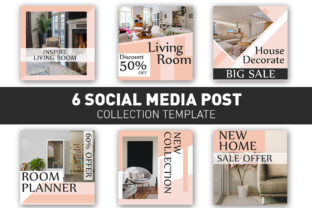
Adopting a new set of templates is less about a complete overhaul and more about strategic enhancement. Start by auditing your current content. What types of posts do you share most often? Is it before-and-after shots, detailed product features, or inspirational quotes? Identify the 2-3 most common post types you create. Then, select the corresponding template variants from the set of 6 Social Media Post Design Templates.
Before you commit, test them. Drop in a few of your own high-quality photos. Does the layout complement your photographic style? Does the default color palette work with your typical imagery, or will you need to adjust it? This is the evaluation phase. Pay close attention to readability. Ensure that any text overlays have sufficient contrast against your images. The beauty of a modern interior style is its clarity, and your templates should uphold that principle.
Remember, the photos used in the product presentation are just examples. Your own images are the star of the show. The template is the stage, the lighting, and the set design—it frames your content beautifully but doesn't overshadow it. Use the structure to guide your content creation. Perhaps you'll create a weekly series using a specific template for "Material Spotlight" or "Design Tip Tuesday." This not only saves you time but also trains your audience to anticipate and engage with your content more readily.
Ultimately, a resource like the Social Media Post Home Modern Interior pack is about removing friction from the creative process. It handles the heavy lifting of layout and composition, freeing you to focus on what you do best: capturing and sharing the beauty of modern living. It’s a practical investment in your visual workflow, helping you present a polished, professional, and engaging front to the world with less effort and more impact.